


To schedule an automated event reminder for your guests, follow these steps:
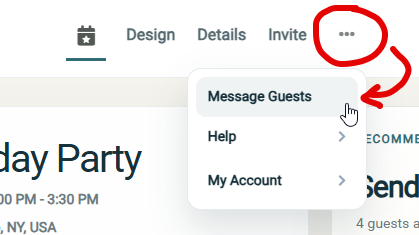
Step 1: Access the event 'Message Guests' screen
- You can access this page anytime by opening the event and clicking on the more options icon and then clicking "Message guests" in the top navigation bar
Step 2: Click the "Auto Reminder" option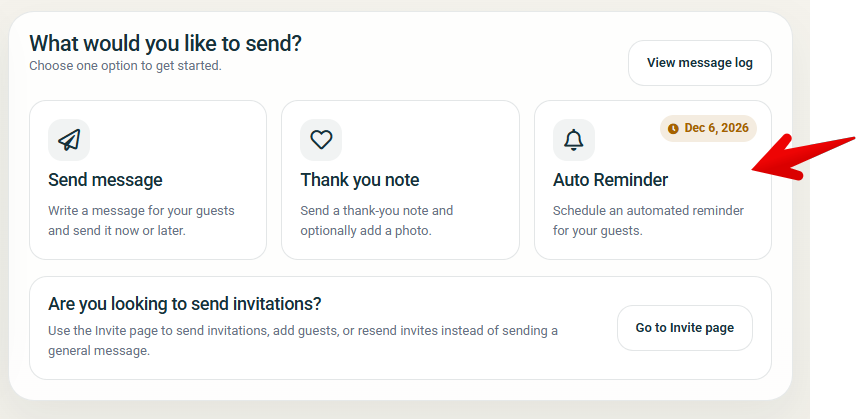
Step 3: Set Reminder Date and Recipients
- Choose your reminder date (by default this will be 1-week before the event date)
- Choose the recipients by checking the checkbox for all groups that apply, your choices are:
- Remind guests that "Are Attending"
- Remind guests that are "Maybe"
- Remind guests that are "Not Attending"
- Remind guests that have "No Reply"
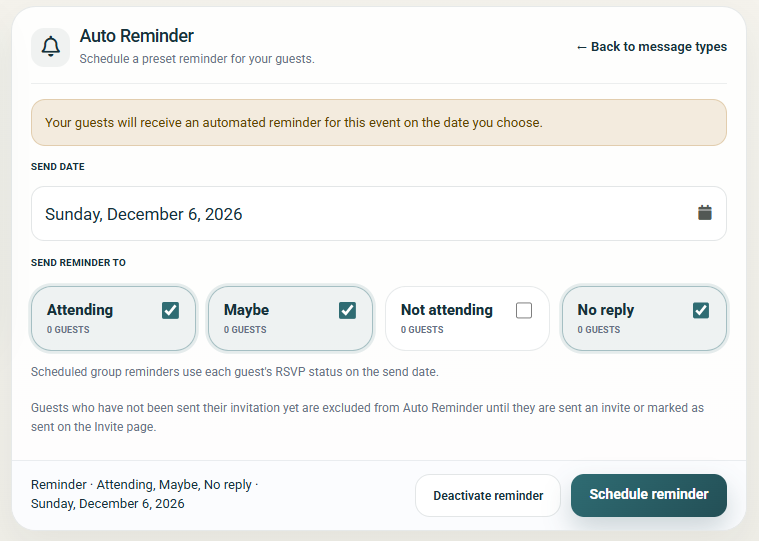
Step 4: Click "Schedule reminder"
NOTE: You can also send messages to your guests at any time using the Message Center